CLEAVE ボーカルチョップ簡単作成VST3プラグイン
- ダウンロード商品CLEAVE - 寄付版(内容は変わりません)¥ 300
- ダウンロード商品CLEAVE - 無料版¥ 0無料ダウンロードCLEAVE_-_FREE.zip(2.86 MB)CLEAVE_-_FREE.zip
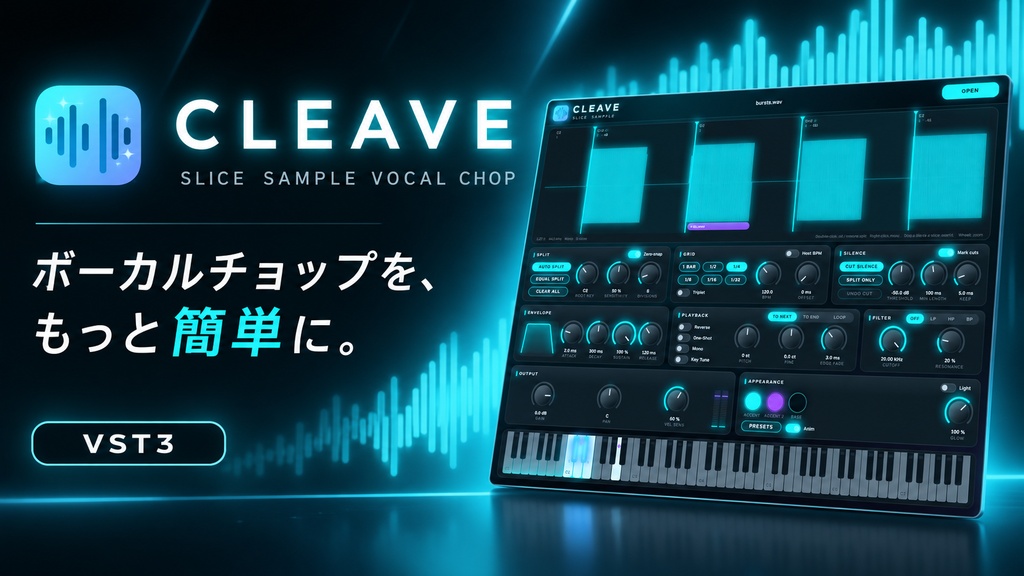
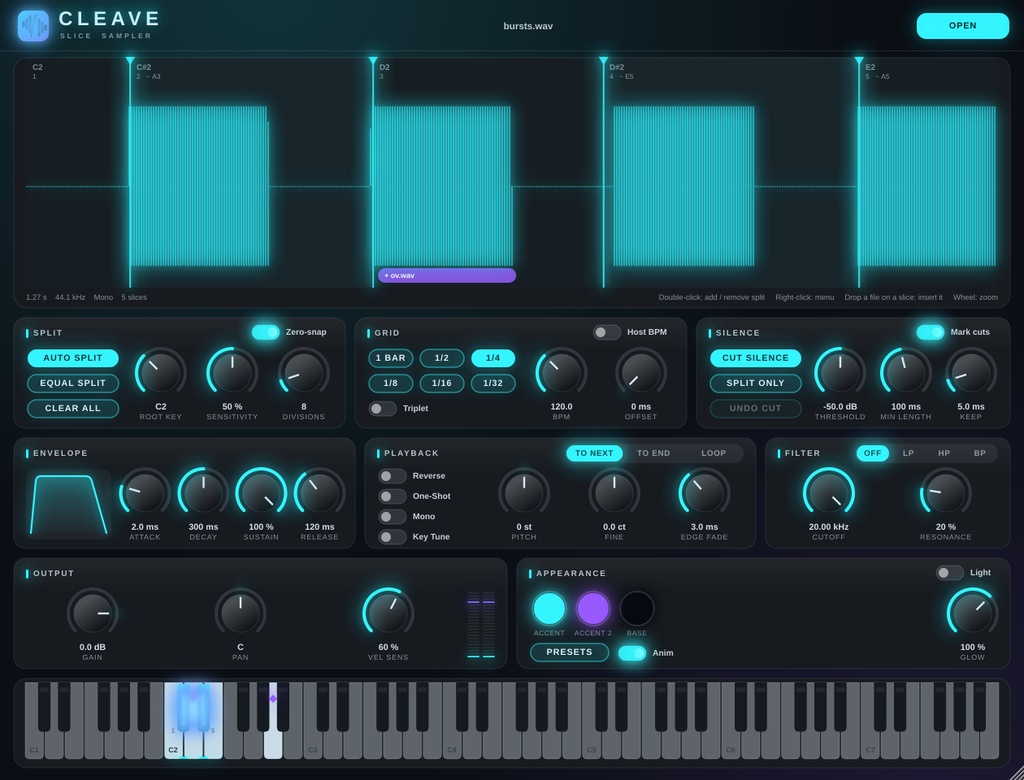
■ CLEAVE とは 音声ファイルをドロップして、波形をダブルクリックで切って、 切った区間を半音ごとに鍵盤へ割り当てて弾く、スライス型サンプラー(VST3)です。 ボーカルチョップ、ドラムループの切り貼り、ワンショットのサンプラーとして使えます。 光るUI(グロー表現)とアニメーション付き。色は自由に変えられ、ライトテーマも用意しています。 ■ 主な機能 【分割・割り当て】 ・音声ファイルをドラッグ&ドロップするだけで波形を表示 (WAV / AIFF / FLAC / MP3 / OGG) ・波形をダブルクリックで分割線を追加、ドラッグで移動、右クリックで削除 ・分割した区間が、ルートキーから半音ずつ鍵盤に自動で割り当て ・鍵盤を押すと、その区間を次の分割線まで再生(最後まで再生/ループも選べます) ・波形クリックで、その区間をすぐ試聴 ・ホイールでズーム、Shift+ドラッグで移動 【ワンクリック分割】 ・GRID:1小節 / 1/2 / 1/4 / 1/8 / 1/16 / 1/32 をワンクリックで一瞬で分割 3連符、開始位置のオフセット、DAWのテンポ同期(Host BPM)に対応 ・AUTO SPLIT:音の立ち上がりを検出して自動で分割 ・EQUAL SPLIT:指定した数に等分割 ・分割線はゼロクロスに吸着(クリックノイズ対策) 【無音カット(SILENCE)】 ・指定したdB以下の無音部分を削除。しきい値・最小長・残す余白を調整できます ・カットした位置に自動で分割線を配置 ・削除せず、無音の終わりに分割線だけ置く「SPLIT ONLY」 ・UNDOで元に戻せます。パネルにマウスを乗せると、削除される範囲を赤くプレビュー 【Key Tune(音程自動補正)】 ・各区間の音程を自動で検出し、割り当てられた鍵盤の音に合わせて再生 (「ド」の鍵盤なら、ドに揃った音が鳴ります) ・トグルでオン/オフ 【サンプル差し込み】 ・波形の区間や鍵盤に別の音声ファイルをドロップすると、その鍵盤だけそのファイルを再生 ・メインの波形が無くても、鍵盤にドロップすれば普通のサンプラーとして使えます ・複数ファイルを鍵盤にドロップすると、連続する鍵盤に順番に割り当て 【音作り】 ・ADSRエンベロープ(波形の動きがグラフで見えます) ・ピッチ(±24半音)/ファイン、ベロシティ感度、エッジフェード ・リバース / ワンショット / モノ ・フィルタ(LP / HP / BP)、ゲイン、パン、レベルメーター ・同時発音32 【デザイン】 ・ダーク / ライトテーマ、プリセット8種 ・アクセントカラー、サブカラー、ベースカラーを好きな色に変更 ・グローの強さ、アニメーションのON/OFF ・ウィンドウはリサイズ可能 ■ 使い方(かんたん) 1. 波形エリアに音声ファイルをドロップ(または OPEN) 2. 波形をダブルクリックして分割線を追加(または GRID / AUTO SPLIT で一括分割) 3. 鍵盤(MIDI)を押すと、区間が鳴ります ※ルートキー(初期値 C2)が最初の区間に対応します
作成者公式サイト
https://high28.net
インストール方法
1. ダウンロードしたZIPを展開します 2. 「CLEAVE.vst3」フォルダを次の場所にコピーします C:\Program Files\Common Files\VST3 3. DAWでプラグインを再スキャンします
動作環境
・Windows 10 / 11(64bit) ・VST3対応のDAW ・動作確認済みDAW:REAPER、FLStudio ・VST2 / AAX / Mac / 32bit には対応していません
注意事項
・プロジェクトには、サンプルの「ファイルの場所(パス)」を保存します。 ファイルを移動・削除すると、再読込できなくなります。 (無音カット後の音声は、プロジェクトに埋め込んで保存されます) ・Key Tuneは再生速度を変えて音程を合わせる方式のため、補正すると再生時間も変わります。 また、ドラムなど音程の無い音は補正されません。 ・1つのサンプルあたり、分割線は最大120本、読み込みは最大15分までです。 ・ご利用環境によっては、WindowsのSmartScreenやセキュリティソフトが警告を出す場合があります。 ・本製品の使用により生じた損害について、制作者は責任を負いかねます。 ・読み込む音声の著作権・利用規約は、ご自身で確認してください。
利用規約
・個人・商用のどちらの制作にも使用できます(ご自身の楽曲での使用は自由です) ・本製品(プラグイン本体)の再配布・転売・譲渡は禁止します
サポート、お問い合わせ
・不具合のご連絡は、BOOTHのメッセージ または 【X / メールなど】 まで ・アップデートは、購入済みの方にご案内します ・DISCORDでも対応します。 https://discord.high28.net VST is a trademark of Steinberg Media Technologies GmbH.
英語版
■ What is CLEAVE? CLEAVE is a slice sampler (VST3). Drop in an audio file, double-click the waveform to cut it, and each slice is assigned to a key, one semitone at a time, so you can play it from your keyboard. Use it for vocal chops, rearranging drum loops, or as a one-shot sampler. It comes with a glowing UI (bloom effects) and smooth animations. You can change the colors freely, and a light theme is included. ■ Features [Slicing & Key Mapping] ・Just drag and drop an audio file to display its waveform (WAV / AIFF / FLAC / MP3 / OGG) ・Double-click the waveform to add a split line, drag to move it, right-click to delete it ・Slices are automatically assigned to keys, one semitone each, starting from the Root Key ・Press a key to play that slice up to the next split line (you can also choose "play to end" or "loop") ・Click the waveform to instantly audition a slice ・Mouse wheel to zoom, Shift + drag to pan [One-Click Splitting] ・GRID: split instantly with one click at 1 Bar / 1/2 / 1/4 / 1/8 / 1/16 / 1/32 Supports triplets, a start offset, and DAW tempo sync (Host BPM) ・AUTO SPLIT: detects note onsets and splits automatically ・EQUAL SPLIT: divides the sample into a specified number of equal slices ・Split lines snap to zero crossings (to prevent click noise) [Silence Removal (SILENCE)] ・Removes the parts below a dB threshold you set. Threshold, minimum length, and the margin to keep are all adjustable ・Automatically places split lines at the cut points ・"SPLIT ONLY" places split lines at the end of each silence without deleting anything ・UNDO restores the original. Hover over the panel to preview the regions to be removed, highlighted in red [Key Tune (Automatic Pitch Correction)] ・Detects the pitch of each slice and plays it tuned to its assigned key (play a "C" key and you hear the slice tuned to C) ・Can be switched on and off with a toggle [Sample Insertion] ・Drop another audio file onto a slice or a key, and that key plays that file instead ・Even without a main waveform, you can drop files onto the keyboard and use it as an ordinary sampler ・Drop multiple files onto a key to assign them in order to consecutive keys [Sound Shaping] ・ADSR envelope (the shape is shown as a graph) ・Pitch (±24 semitones) / Fine, velocity sensitivity, edge fade ・Reverse / One-Shot / Mono ・Filter (LP / HP / BP), gain, pan, level meter ・32-voice polyphony [Design] ・Dark / Light themes, 8 presets ・Freely change the accent, secondary, and base colors ・Adjustable glow intensity, animations on/off ・Resizable window ■ System Requirements ・Windows 10 / 11 (64-bit) ・A VST3-compatible DAW ・Tested DAWs: [Enter the DAWs you have tested yourself] ・VST2 / AAX / Mac / 32-bit are not supported ■ Installation 1. Extract the downloaded ZIP file 2. Copy the "CLEAVE.vst3" folder to the following location: C:\Program Files\Common Files\VST3 3. Rescan plugins in your DAW ■ Quick Start 1. Drop an audio file onto the waveform area (or press OPEN) 2. Double-click the waveform to add split lines (or split everything at once with GRID / AUTO SPLIT) 3. Press keys (MIDI) to play the slices * The Root Key (default: C2) corresponds to the first slice ■ Notes ・Projects store the "file location (path)" of your samples. If you move or delete the files, they can no longer be reloaded. (Audio edited with silence removal is embedded in the project and saved with it.) ・Key Tune matches pitch by changing the playback speed, so correcting a slice also changes its playback length. Unpitched sounds, such as drums, are not corrected. ・Each sample supports up to 120 split lines and a maximum length of 15 minutes. ・Depending on your environment, Windows SmartScreen or your security software may show a warning. ・The author accepts no responsibility for any damages arising from the use of this product. ・Please check the copyright and terms of use of any audio you load yourself. ■ Terms of Use ・Can be used for both personal and commercial productions (you are free to use it in your own music) ・Redistribution, resale, or transfer of this product (the plugin itself) is prohibited ■ Support & Updates ・For bug reports, please contact me via BOOTH messages or [X / email, etc.] ・Updates will be announced to customers who have purchased the product VST is a trademark of Steinberg Media Technologies GmbH.
アップデート履歴
[2026-11-26: v1] 公開開始